Ten camera settings worth changing on your phone today
Phone cameras are brilliant on autopilot, but a few settings can make your photos noticeably better. Most take seconds to change.
- Turn on the grid. It helps you keep horizons straight and use the rule of thirds.
- Clean the lens. Not a setting, but the single biggest fix for hazy photos.
- Tap to focus, then adjust exposure. Drag the brightness slider down for skies and sunsets.
- Lock focus and exposure with a long press when shooting a moving scene from the same spot.
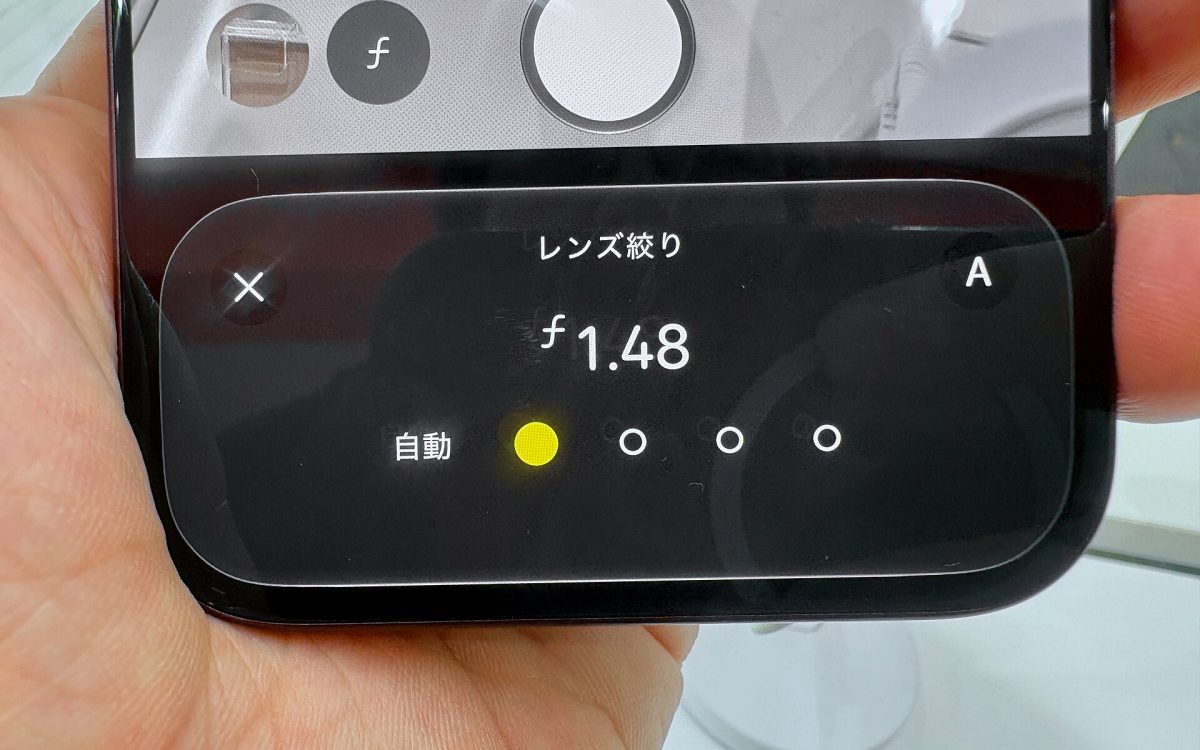
- Try the aperture control if you have one. The iPhone 18 Pro’s main camera can switch between f/1.48 and f/4: open wide for blurred backgrounds and low light, close down for group photos and landscapes where everything should be sharp.
- Choose your video resolution. 4K at 30 fps is a great default; use 60 fps for action.
- Use the high-resolution mode in good light for landscapes you want to crop or print — 48MP and 200MP sensors shine here.
- Use RAW for serious editing — files are larger, but highlights and shadows are easier to recover.
- Review location tags. Photos can record where they were taken. Remove location before sharing publicly if privacy matters.
- Learn your zoom buttons. The preset 2×, 3× or 5× shortcuts use the best lens for that framing; pinching to in-between values can reduce quality on some phones.
One habit beats every setting
Take more than one shot. Capture a few frames of people, then keep the best — storage is cheaper than the moment.
Cover photo (cropped): Kyu3a, CC BY-SA 4.0, via Wikimedia Commons